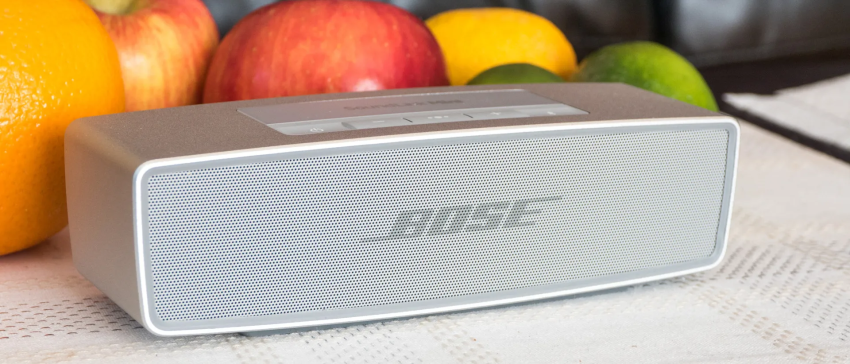
The Bose SoundLink Mini ONE is a well-known portable Bluetooth speaker valued for its compact size, rich sound, and durable design. Many users enjoy it for music at home, travel, or office use. However, like any electronic device, it can develop common problems after frequent use or long-term ownership. New users may notice setup issues, while older units may experience battery wear or charging trouble.
Understanding these problems early can help you avoid unnecessary frustration and keep the speaker performing at its best. In this guide, we answer five common questions users often search for and explain practical solutions in detail. We also discuss how to protect the bose soundlink mini one battery for better long-term performance.
Why Is My Bose SoundLink Mini ONE Not Charging?
Charging issues are one of the most common complaints among Bluetooth speaker owners. If your Bose SoundLink Mini ONE is not charging, begin by checking the charging cable and power adapter. Many charging failures are caused by worn cables, loose connectors, or adapters that do not provide enough power output.
Next, inspect the charging port on the speaker. Dust, lint, or small debris can build up inside the port and block proper contact. Use a soft brush or compressed air to clean it carefully. Avoid using metal tools, as they may damage internal components.
If the speaker still does not charge, leave it connected for at least 30 minutes. Sometimes a fully drained bose soundlink mini one battery needs extra time before the charging light appears.
You can also try a reset by holding the power button for around 10 seconds. If charging remains inconsistent after these steps, battery aging or internal charging circuit damage may be the cause.
Why Won’t My Bose SoundLink Mini ONE Connect to Bluetooth?
Bluetooth pairing problems can happen with both new and older devices. If your speaker does not connect, first turn Bluetooth off and back on again on your phone, tablet, or laptop. Then restart the speaker.
Many users forget that speakers store previous pairings. If too many devices are saved, the connection process may become unstable. Remove the speaker from your device’s Bluetooth settings, then pair it again as a new device.
Keep the speaker within normal Bluetooth range, ideally within a few meters. Walls, desks, Wi-Fi routers, and other wireless devices may create interference.
If the issue happens repeatedly, check for software updates on your phone or computer. Outdated operating systems can sometimes create compatibility problems with Bluetooth accessories.
Why Is the Sound Quality Poor or Distorted?
The Bose SoundLink Mini ONE is designed to deliver balanced sound, so distortion usually points to an external issue rather than speaker failure. Start by lowering the volume on both the speaker and the connected device. If both are set too high, the audio signal may clip and sound harsh.
Also consider the quality of the music source. Low-bitrate files, poor streaming connections, or heavily compressed audio can sound muddy even on a premium speaker.
Physical dirt may also affect sound output. Dust covering the grille can reduce clarity, especially in the bass and midrange. Gently clean the surface using a dry microfiber cloth.
If distortion only happens wirelessly, test the speaker with another phone or tablet. This can help determine whether the issue comes from the speaker or the connected device.
Why Does My Bose SoundLink Mini ONE Battery Drain Quickly?
Battery runtime naturally decreases with age. After hundreds of charge cycles, rechargeable cells lose capacity. If your speaker no longer lasts as long as before, this may simply be normal battery wear.
To improve runtime, reduce playback volume and disable the speaker when not in use. Leaving it powered on between listening sessions can slowly drain power.
Heat is another major factor. Avoid storing the speaker in hot cars, direct sunlight, or near heaters. High temperatures can shorten the lifespan of the bose soundlink mini one battery.
Charging habits also matter. Constantly keeping the speaker plugged in for long periods may stress older batteries. It is often better to charge when needed and unplug after reaching full charge.
If usage time has become extremely short, replacing the bose soundlink mini one battery may restore much better performance.
Why Is My Bose SoundLink Mini ONE Not Turning On?
If the speaker does not power on, do not assume it is broken immediately. In many cases, the battery is simply deeply discharged. Connect it to a charger and leave it plugged in for at least 30 minutes before testing again.
Press and hold the power button for several seconds. Some users tap quickly and think the device is unresponsive.
If there is still no response, perform a reset by holding the power button for around 10 seconds. Then reconnect the charger and try again.
If the speaker shows no lights, no sound, and no charging response, the problem may involve a failed bose soundlink mini one battery, damaged charging board, or internal hardware fault. At that stage, professional repair or battery replacement may be necessary.
The Bose SoundLink Mini ONE remains a popular speaker because of its strong sound quality and portable design, but common issues can appear over time. Charging problems, Bluetooth pairing failures, battery drain, distorted sound, and power issues are the most frequent concerns users face.
The good news is that many of these problems can be solved with basic troubleshooting, proper cleaning, and better charging habits. Paying attention to cable quality, storage conditions, and overall battery care can significantly extend speaker life. With regular maintenance, your Bose SoundLink Mini ONE can continue delivering reliable performance for many years.